
Loaners are a tricky inventory challenge to tackle, particularly because every organization has their own recipe for how they work. However, we have a few tools in Beacon that make them easier to keep track of.
Consignment Status and Due Back Dates
The best way to manage loaner trays in Beacon is by setting their consignment status and managing due back dates to ensure their prompt return. Learn more about how to manage loaned inventory here.
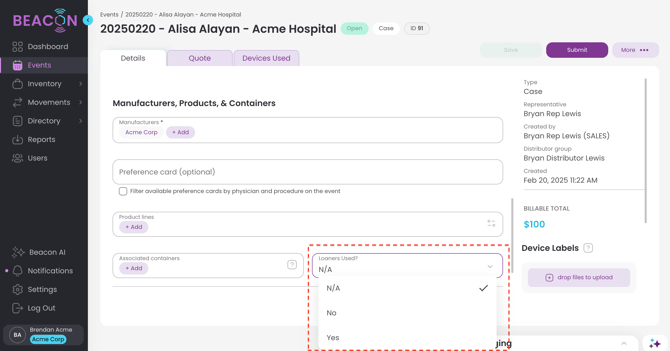
Mark Loaners Used on an Event
You may mark a status in an event denoting that Loaner trays were used.
1. After you create your event, open up the Event Detail Screen.
2. Scroll down to the Loaners Used dropdown menu
3. Select the Loaner Used Status
4. Click Save.
Bills of Materials
It can also be useful to use Bills of Materials to manage the creation or updating of loaner trays.
If your operation creates custom trays or manages various configurations of loaner trays, click the link above to read about how you can use Bills of Materials to easily add/remove items according to a Bill of Materials template.